 Yup, check the date again…
It’s Friday the 13th…
Either you are superstitious about dates or it doesn’t faze you. Todays post is for the first group 🙂

(Source: HorrorBid)
Yup, check the date again…
It’s Friday the 13th…
Either you are superstitious about dates or it doesn’t faze you. Todays post is for the first group 🙂
(Source: HorrorBid)
Ever wonder why you need to press CTRL + ALT + DEL to logon to Windows? Or CTRL + ALT + DEL to reboot a PC?

Hack-A-Day website had a very interesting article and video about David Bradley who is credited for it.
To quote the site:
You may not have ever thought about it, but the far-too-often-used keyboard combination of Control + Alt + Delete had to have been brought into existence by some random coder at some point in technological history. But wait, it wasn’t just a random coder. The keystroke combo is attributed to [David Bradley]. He was one of the original designers of the IBM Personal Computer. You can even hear his own recount of the story in the video after the break.
He came up with the idea after growing weary of waiting for the Power-On Self Test (POST) routine to finish during each reboot of his software testing regiment. We remember the old days of slow hardware and can understand his frustration at the lost time. He decided to throw in a shortcut that allowed the software to reboot without power cycling the hardware. The original implementation used CTRL-ALT-ESC, but was later changed so that one frustrated keyboard mash couldn’t accidentally reboot the system.
Here’s the video:
[youtube=http://www.youtube.com/watch?v=K_lg7w8gAXQ]
How you like Bill Gates reaction… 🙂
(Source: Hack A Day)
 The previous post in this thread was how to install apps on the non-Google Market approved Tablet. Todays post is about what apps I have installed, with a screenshot gallery at the end.
Here is what my Application Menu looks like:


Here are the apps:
I will update the list in future, but for the meantime this should keep you busy 🙂
Here is the screenshot gallery as promised…




One of the trade offs when buying a non-branded Chinese Tablet is that Google, by default, will not allow the device to connect to the Google Market and download apps like “normal” approved devices. It is understandable, but at least there is hope.
You have 3 options on how to install apps on your device:
I opted for options 2 and 3.
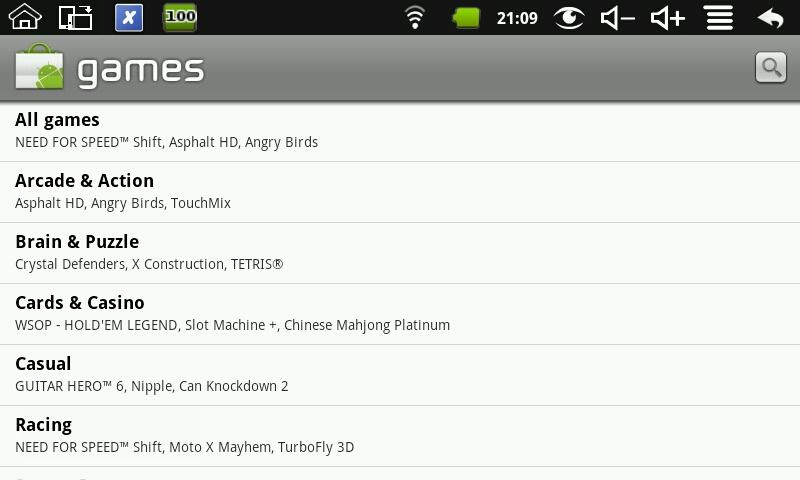
Let me start off by saying that the Market app preinstalled on the tablet is NOT the Google Market one. The setup screens look the same, but it definitely is a Chinese knockoff and not worth wasting your time with it – take my word for it. This is what it looks like…

I also tried a whole bunch of alternative stores, without success. Either when trying to download the apk file and install directly on the device it would not allow it to install, or when install it would crash. The one I tried caused the device to be so unstable that I ended up Factory Defaulting the device…
The one that installed and worked like a charm was Applanet Market. Now some of the content in the market is “questionable” with apps that sometimes are payable in the official Market, being listed in it as “free” … if you know what I mean…
The one app that I could only get using Applanet was the free version of Gauge Battery Widget. I tried everywhere!
To install, use the Tablet’s browser and head over to http://applanet.net . There you click on the PC Download and the run the app. Once installed a new icon will appear on the menu and you good to go.

This is what it looks like on the device:


Finding websites that house apps where you can download and install the apk files directly can be pretty difficult. Either you go to the developers site and hope that they have the apk on their site, and don’t just refer to Google’s Market or try a Google search and go thru them one-by-one. A site I can recommend you can go to is the FreewareLovers.com website… 🙂 (no its not THAT typre of site)
This website is not fancy but it does a great job. You register on the site, search for the app, click download and then manually install it. No mess, no fuss!
This was the main method that I used to install apps like the Kindle Reader.
In the next post I will have a list of the apps I have installed with another screenshot gallery.
Till next time…
 Todays post is not really a mix, but this has still seriously got to be the most awesome advert I have seen in a LONG time.
Make had this post about an advert for the Sharp SH-08C handset, that was filmed a day before the earthquake and tsunami disaster. The company built a long marimba in the forest and using only a wooden ball played a tune…

To quote the post:
This remarkably beautiful video, uploaded to YouTube one day before the Tohoku earthquake and tsunami, turns out to be an ad for Sharp’s SH-08C handset. It is, nonetheless, something you shouldn’t miss: in a tranquil forest, a single wooden ball rolls down a stepped wooden ramp, continuously, for two minutes. At each step, it falls and strikes a wooden bar tuned to play a single note of the 10th movement of Bach’s Herz und Mund und Tat und Leben, BWV 147, commonly known by its English title, Jesu, Joy of Man’s Desiring. Wait ’till you see how they handle the sustained notes.
Enjoy the video:
[youtube=http://www.youtube.com/v/C_CDLBTJD4M]
(Source: Make)
Hollywood has managed to glorify the hackers of the world as freedom fighters, or fighting the power, as it were. But the real world actions of these hackers cost IT companies on average $4 billion annually, while stealing close to $1 trillion in intellectual property across the world.
Here are some interesting information about hackers…

[Source: OnlineMBA.com]