
Eish! Amazon Kindle Store Pricing Con?

From the Eish! DepartmentI must start by saying that I used to be a huge fan of Amazon and the Kindle, but sadly I found something that made me feel like Amazon were being scaley… :mad:.

The Kindle idea is a great one.

You can buy an E-Reader called the Kindle from Amazon, or load the Kindle app on your Windows Mobile, iPhone/iPod Touch/iPad, Android device, Blackberry or PC or Mac. Books purchased on the Kindle store (on Amazon) are then synchronized between all your devices, This means you can start reading an E-Book on your PC, then continue reading on your iPod Touch on the way to work, and then on your cellphone when you have a few minutes free before your next meeting.  Tonight you can carry on reading on your PC or Kindle from where you left off.

Books stay yours forever and you can archive them when done or even loan them to a friend.  You can purchase a book immediately so no waiting for stock at your local bookstore. If you get a new Kindle or Tablet, load the app and have access to all your books you have purchased.  You are also saving the planet as no paper is needed, and the E-Books are generally cheaper than their paper alternatives…and it is all downloaded for free to your devices (cost of your internet connectivity may apply)


Now the reason for this post. Every now and then I browse the Kindle store for books that I might be interested in reading. Sometimes you are lucky and you see E-Books for $0.00 (free). You click on purchase and then it downloads to your profile.

Sunday morning the 24th of April, I was surfing the net on my new Android Tablet and browsed the Kindle store. I saw an E-Book called “Let’s Go Europe 2011: The Student Travel Guide” its price was listed as $0.00 so I clicked clicked purchase and the book downloaded.

Checking my email later that afternoon I saw an invoice from Amazon.com for $2.00 for the book…

I fired up Google Chrome browser and did a search for the E-book.  This is the address – http://www.amazon.com/gp/search?kc=AG56TWVU5XWC2&keywords=Let%27s+Go+Europe+2011%3A+The+Student+Travel+Guide&qid=1303655116&rh=i%3Adigital-text%2Ck%3ALet%27s+Go+Europe+2011%3A+The+Student+Travel+Guide&x=11&y=14

The price was listed as $0.00.  Thats strange… So logged in and then suddenly the price was $2.00. Hmmm…. I logged out of Amazon and then checked the price again – $0.00. Something was not making sense here… have a look at the screenshot if you don’t believe me.

Ah-ha! It must be because it is USA, no problem lets change it to Africa (as we know that South Africa is part of Africa)

Bingo!  Now the free E-Book, that is downloaded via my own internet connection, (remember there is no postage involved, or customs taxes) is now suddenly costing $2.00…

I started cycling through the different regions options see how much it would cost depending on where in the world you are based… have a look below for prices for USA, UK, Middle East, Latin America, India, Europe, Canada, Australia, Pacific & Asia, Africa…

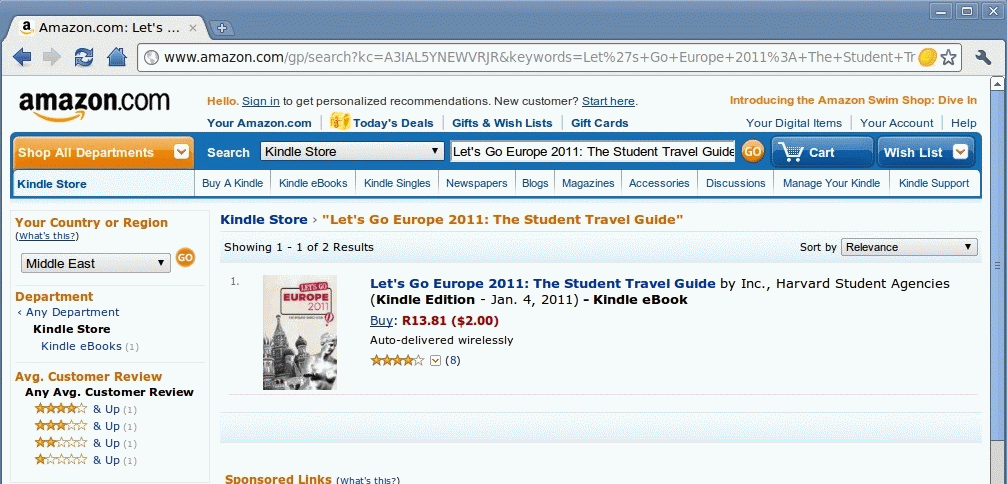
If you wondering why there is Rand value in the screenshot, it is a Chrome Extension called the Chrome Currency Convertor, that shows prices in local currency.

So here is a breakdown for you…to get the Kindle electronic version of “Let’s Go Europe 2011: The Student Travel Guide” you will pay:

  • $ 0.00 – United States, Asia & Pacific, Australia, Canada, India
  • $ 2.00 – Africa, Latin America & Caribbean, Middle East
  • $14.11 – United Kingdom
  • $15.71 – Europe

So if you LIVE in Europe, buying the book called “Let’s Go Europe 2011: The Student Travel Guide” will cost you the most out of all the continents!

I just can’t understand how that makes sense.

It is the same book regardless of where you buy it. It is in electronic format, so nothing to post and no need for paper or ink costs.  You are not “importing” is to there are no customs or taxes involved.  You use your own internet connection to download it – so magical fairies are not bringing it to you. So how is this possible?  Or is this just plain discrimination?

Yes I do feel a lot better about being in Africa compared to Europe if I compare the costs, but seriously now why can it not be one price regardless of country or continent?

This is the first e-retailer that I have seen this type of pricing…unless you know of another…?

I have emailed the support at Amazon for explanation on this and will advise when I get feedback…right now I am not happy…yes I know it is only $2.00, but $2.00 is still more than $0.00…

Will keep you posted…

Interesting Facts about Microsoft

Love them or hate them, Microsoft will be no doubt be around for many years to come…


Online MBA Programs
(Source: OnlineMBA.com)

(Part 3) Android Tablet: Default Software

Well we’ve done the unboxing, and the initial impression of my latest toy, the R700,00 Android Tablet; now to move onto the software of the device and what one can actually do with it…

By default the tablet comes loaded with a whole bunch of software, some of them useful, others still trying to figure out thanks to the Chinese language.

When you switch on the device this is the screen that greets you:

OK the one thing that I changed on the tablet before taking the screen shot was the weather app to display my towns weather.

If you take a close look at the screen shot, you will notice a bunch of icons on the Task Bar on the top of the screen (in the black bar). These are always visible.

Starting from the left side there is a picture of a house – this is your HOME button, and pressing this will always bring you back to the desktop or Home Screen. Holding the HOME button down will bring up a list of 6 applications currently running or recently run.

Next icon is the WIFI icon where you can see if you are connected to a WiFi network and the strength of the connection.

The green BATTERY icon is next – don’t believe it – it lies and you need to install a proper battery app.

Next is the TIME icon – I found that if I let the Tablet discharge fully it would actually loose time and date and default back to 2000. Keep an eye on this if you intend using the Tablet with sites that use certificates, as if the date is wrong it will not allow you in…

Next to the time icon is the SCREEN CAPTURE icon. This is only visible when in horizontal mode 🙁 and the the screen captures where made with it.  You can choose to capture to internal device memory or SD Card.

Next are the VOLUME – and the VOLUME + and these can we used to increase/decrease volume if you don’t feel like using the switch on the side of the Tablet.

The next icon is the MENU button. This is needed on Android phones to bring up the options menu in whatever app you are in. It is similar to Windows right  mouse button menu.

The last icon is the BACK button.  You can use this or the button in the middle bottom of the Tablet to go to the previous screen or option.

The next set of icons are the ones on the right side of the screen shot, laying vertically in a light grey area.  This you can call the launcher bar, a place where you keep those apps you want easy access to instead of going to the application menu and selecting it there. Starting from the top you have Calendar, PkManger (an application manager), Settings, Calculator, Camera, Contacts and then Application Menu button at the bottom (this cannot be removed).

I have put together a gallery of the apps that come with the Tablet.  The screen shots of the Applications Menu contains apps that I also installed, but I will go into that in the next post.  Until then enjoy.


Monday Mix – Inspirational Adverts

There is a great blog called the “Personal Excellence Blog” that I check out every now and then for some motivational or inspiring reads.

On the 12th of April they had an interesting post titled: “15 Amazing Commercials That Will Inspire the Greatness in You”.

Here are a few of these adverts from the post. If you find these inspiring check out the rest on the site.


1. Every Good Thing in Life (Cheers Beer, Thailand)

[youtube=http://www.youtube.com/watch?v=IILoTmIXd7s]

The ad reminds us of those little things we tend to take for granted in life. Yet these are part of the moments that make life beautiful, aren’t they? What are the moments you relish in? What are the things that make you smile? What are the things you’re grateful for in life? Write them down in your life handbook, hold them dear to your heart and never let them go.

2. Excuses (feat. Warhawk Matt Scott, Nike)

[youtube=http://www.youtube.com/watch?v=obdd31Q9PqA]

Matt Scott is an American basketball player. He has spina bifida – a disorder that existed before birth and caused him to be wheelchair bound.

In the ad, Matt lists a whole bunch of excuses people use every day to explain why they’re not doing things they ought to be doing. Have you heard of the term “excusitis”? It’s a deadly disease where people make excuses for why they’re not living the life they want, rather than take action to create it. Ask them why they’ve not achieved a certain result? Their reply “Oh, because I’ve been busy” or “There’s a lot of things on my plate” or “I don’t really want it” or “There was something else that cropped up in the past few months” and so on and so forth. Endless reasons; endless excuses.

The only time when results happen is when you take ownership for your life and stop finding excuses. In life, either you can either be in the group of people that’s busy out there achieving results they want, or you can be in the group that’s constantly looking for reasons to explain why they’re not living the life they desire. Which group do you want to be in?

3. Maybe (feat. Michael Jordan, Nike)

[youtube=http://www.youtube.com/watch?v=woOu_4l3lio]

I thought this ad is so simple yet so amazing. It conveys the classic problem of how people constantly try to explain away their ability to create success. This ability has been in there all along, yet they deny its presence, and instead point the finger at other things around them.

Are you actively pursuing and achieving your goals right now, to the max? If no, why not? What reasons are you giving for not doing so?

Believe it or not, we are our own limitations. It’s not our moms, our dads, our brothers/sisters, our partners, our friends, our colleagues, our bosses, our jobs, the governments, the societies, the economy, or anything like that. It’s us. It’s always just been us limiting ourselves all along – whether through conscious self-limitation, or allowing others to limit us (which still links back to us).

The sooner we realize that, the faster we’ll be able to create the life we want. The extent to which we can achieve what we want is directly linked to the degree of responsibility we take for our goals and life. The more responsibility we take, the more results we’ll start seeing from our goals.

4. Dare (Saga)

[youtube=http://www.youtube.com/watch?v=sb2YOg_dkQM]

The ad depicts the moments in life when we experience fear. From performing in front of a panel, to going out in the sea, to being asked to pose nude in front of an art class, to presenting in a meeting, to seeing your partner with someone else.

The amazing thing about fear is that when you face it head on – when you take the step to confront it, it disappears in your face. This is also why fear is commonly referred to in the self-help arena as False Evidence Appearing Real. Are you ready to start tearing away these false evidence in your life?

5. Think Different (Apple)

[youtube=http://www.youtube.com/watch?v=4oAB83Z1ydE]

…All of us have always had the power in us to change the world. There’s not even a reason to doubt that. This world is ours; our subconsciousness begets us with unlimited resources and power, and we’re all connected as one.

So the question is – what do you want to bring about to the world? What kind of change do you want to create? What revolution do you want to start? What ground-breaking, earth-shattering movement do you want to lead?

What is the impact you want to deliver to this world by the time you are done?

6. You Can Shine (Pantene, Thailand)

[youtube=http://www.youtube.com/watch?v=Um9KsrH377A]

The advert tells of a beautiful story of perseverance and self-belief. It’s in Thai but has english subtitles, so you’d have no problem understanding. Have naysayers in your life? Are you short changing yourself because of what others say? Are you withholding who you are on the inside because you try to be someone you’re not? It’s time to start believing in who you are and what you can be. Let the real you emerge; this is what it means to live your life to the fullest.

MadMike: I think this was a fantastic advert that gives me goosebumps everytime I view it.

7. Cancer (Lance Armstrong, Nike)

[youtube=http://www.youtube.com/watch?v=gWBTNPTAJTc]

And finally, leaving the best for the last – the rare “Cancer” ad featuring Lance Armstrong. This ad features a clip of the 1996 press conference where Lance Armstrong announced he was diagnosed with stage three testicular cancer – at the tender of age of 25.

As you can see from the press conference, held 6 days after his diagnosis, he swore that he would beat the disease. By Jan 1998, he was back into serious training; In 1999, he went on to win the Tour de France each year from 1999 to 2005, and is the only person to win seven times, having broken the previous record of five wins. He would then proceed to be named Associated Press Male Athlete of the Year for the years 2002–2005. He received ESPN’s ESPY Award for Best Male Athlete in 2003, 2004, 2005, and 2006, and won the BBC Sports Personality of the Year Overseas Personality Award in 2003.

Lance’s story, both as a cancer survivor, and as someone who proceeded to win Tour de France 7 times, is an inspiration to all. He did this because he never gave up on himself. He never gave up on fighting the disease. And most importantly, he never gave up on life. If someone can amass such strength even in the darkest of times, that’s something for us to draw from when we face difficulties and challenges in our life.

I trust that you feel inspired for the rest of the week. Do go to the site below for the rest of the 15 Inspirational videos.

(Source: The Personal Excellence Blog)

Competition: 100 Posts!

Today is a milestone for this blog.


This is the 100th post


I would like to thank all of the regular readers (I check the daily site stats) and those giving feedback (you know who you are), without you I have stopped posting and rather have spent evenings in bed watching TV 😆

To celebrate this momentous occasion I will be giving away a small gift to the person that gives the best feedback on this post.  But first you need to answer the following question… Need to figure out how to read the above – check out my post here.

Terms and Conditions:

  1. Competition closes on Sunday 8th May 2011.
  2. My wife will judge who gives the best answer.
  3. I will email the winner and ask for their postal address, and will use the Post Office to send the prize.
  4. You can enter as many times as you like.

Once again thank you for reading and here is to another 100 posts to come!

(Part 2) Android Tablet – Initial Impression

Yesterday you may have read about the unboxing of my newest toy – a 7 inch Android Tablet – that I picked up for R700,00 shipped (was on special).

Today’s post is about my initial impression of the device.

The reason for me buying this Tablet , besides the price, was that I wanted to have a Tablet that:

  1. I could use to read EBooks on (eg. Kindle alternative),
  2. Use to view PDF books on,
  3. Be able to watch the occasional YouTube or video clip on,
  4. Maybe use for notes in meetings instead of a laptop,
  5. Play the occasional game or Skype/Fring on,
  6. See what the fuss is with the growing tablet craze…

Size and Build Quality:

The Tablet is made of plastic and is 19.85cm × 12.7cm × 1.68cm in size and weighs 750g.  There are no screws and it looks like that one has to remove the protective screen covering the LCD screen (no doubt held in place with strong double sided tape) to get to the internals – please note I have no intension to perform a teardown on the device anytime soon.

The back cover is a silver matt colour, and there is no pattern on it to hide scratches or marks, I fear that with age it will show scratches and marks like the iPod Touch’s back plate.  I am considering ordering a sticker of sorts to enable some sort of protection for it.

The display panel in front is also plastic, and not glass like the iPad/iPod Touch and Samsung Galaxy Tab.  This is no doubt to make it more responsive on the resistive touch screen…more about that later.


It is comfortable to hold upright in one hand, and the position of the MENU and VOL+ and VOL- switches on the top right side of the device are positioned comfortably enough to use the in the Kindle app to turn the pages with.  Turning it horizontally obviously gives it a wider viewing area and I tended to use it more in this position than vertically.

Device is light enough to hold and balance in one hand while using it like an E-Reader.

Display:

The G-Sensor is very sensitive and while laying in bed using the device I found it would want  flip the screen between vertical and horizontal at the slightest whim.  Loading the app Quick Settings I was able to turn the auto rotation on and off, the only problem (maybe for some) is that it locks it in horizontal view – will look for app that allows vertical locking.  The transition between vertical and horizontal takes about a second or three depending on what app you currently have open

The biggest thing to remember is that the touch function is resistive type. As a user of a HTC Desire as my primary phone, the screen on the HTC Desire reacts to ones finger tips, if you use a finger nail or stylus the HTC Desire does not respond.  The Tablet is exactly opposite. You need to use your nail or stylus for it to react. The first time it used the device I thought that there was something wrong with the screen 😕  then I tried my nail and immediately it responded.

I tend to keep the protective film on electronic equipment as long as I can, and then promptly replace it with a screen guard. With the film still on the screen (air bubbles and all) it is responsive to tapping, so I will not be ripping it off anytime soon.

One thing I did notice about the display is that it’s rendering of shades was not that great and tended to display it as “grainy” areas where the colours were shaded.  This is obviously noticeable if  you reading an E-Magazine more than if you are reading an E-Book.

Battery and Power:

Like I said, unfortunately they shipped a US plug instead of the European round type that I asked, but luckily I had an Ellis charger that could charge the device up.

To power up you need to hold the power switch in for  about 4 seconds and the device will vibrate and start booting. Just pressing it in (no vibrate) its off state makes the green LED come on and then turn off again and the device stays off.

Charging takes typically about 4 hours and then using the device non-stop on WiFi I was able to get 2 1/2 hours usage out of the device.

The battery icon on the status bar at the top of the screen SUCKS!  It shows “full” until about 3 minutes before the device warns about battery level and then a minute later the Tablet switches off.  I want to download Battery Gauge Widget that I use on the HTC Desire so that I know what it really is…

If the battery has little charge you cannot boot the device 😥  and unfortunately you cannot charge it via USB neither.  If the battery is flat you charge till at least 10% and then you can use it.

Connectivity:

The device only has WiFi, no GPS or Bluetooth, and for me that is fine.  If I am not at home I can always use my HTC Desire HotSpot functionality if I really want to browse the internet on the tablet. I cannot remember when last I used Bluetooth, and for GPS I can use one of the 3 dedicated units I have.

The WiFi connectivity is not as bad as some reviews have stated, I get 3 bars signal strength in my bedroom with the router that is 2 walls and 2 cupboards away.

The one area where connectivity does bother me is the USB Transfer Box that comes with the device.  It’s connector is very thing and I can just see how one day it will bend and break off. Luckily it will only be used when I need to connect a USB device to the Tablet or a RJ45 network cable.   I will however put it on my “To Purchase” list if I can find a spare somewhere online.

The TF-Card slot is easily accessible to insert and remove MicroSD cards.  I put a 8Gb one in and it reads the full capacity without issue.

Interface:

The device does not support the Google Market, however there are ways to get around this (see Part 3 – Software). Overall the interface is pleasant to use and finger nail friendly.  Typing on the on-screen keyboard is obviously easier in horizontal display mode over vertical, but is still very usable in the vertical mode thanks to the size of the screen (I would hate to use a resistive touch display on a 4.3 inch screen).

The launcher that they use is nifty and the MENU and BACK and VOL+ and VOL- are always displayed on the status bar on the top of the screen.  To add items to the home screen or launcher all you need to do is go into the Application Menu and then press and hold the app you want to add and then when the Home Screen shows just move it to where you want it.

Summary:

For the price I paid I cannot complain about not being able to access the Google Market.  I primarily wanted to get a tablet so that I could use it as an E-Book Reader, and it will no doubt be performing this task adequately going forward.  Would I buy another one? Most probably one for my wife yes, but I first want her to give it try.

This tablet will tide me over nicely no doubt until I order and get a HTC Flyer Tablet 😆