PS3: HowTo: Format FAT32 on a Drive Larger than 32Gb

Large hard drives, larger than 32Gb, are common today. In fact it is pretty difficult these days, if not near impossible, to get a drive smaller than 200Gb new.

To be able to use a drive (and we are talking about a Windows system here) one has to create a partition on it (ie. you define how big the usable space should be) and then you format it with a File System – NTFS or FAT32.

FAT32 is not secure compared to NTFS. It has a file size limit of 4Gb. Cannot format drives larger than 32Gb. Does not natively support compression or encryption, and the list goes on and on

NTFS on the otherhand is secure, you can define permissions down to file and folder level. Can create files larger than 4Gb. Can create and format a partition up to 2Tb. Supports Compression, Quota’s and Encyption from the word go…that is why most people format their drives these days NTFS.

So if FAT32 is so “bad” compared to NTFS why would one want to format a drive these days with it, especially drives larger than 32GB?

Well the short answer to that question is compatibility with non-Microsoft operating systems – most if not all can read and write to FAT32, but may not necessarily be able to access NTFS volumes.

If you want to plug an external hard drive into the Playstation 3 then the drive must be formatted with FAT32 and not NTFS.  The PS3 cannot read NTFS.

OK so you have a 500Gb external hard drive that you want to put photos, music and videos on so that you can look and listen to on the PS3…Windows only allows you to format up to 32Gb…Problem…

About 2 years ago I faced this problem and after some searching I found a website called Ridgecorp Consultants. There the chappy had coded and app that would allow one to format any size hard drive with FAT32.  I was skeptical at first.  If Microsoft could not do it how could this dude get it right?  But I gave it a try and I was very impressed with the results!

The app is called “fat32format” and when I first found the app it was only command line driven.  He has now also released a GUI frontend of it.

To quote the website the process is as easy as:

Click Start menu, select Run and enter diskmgmt.msc

If it asks you to initialise the disk, make sure you select a Basic disk, as opposed to a Dynamic.
There’s a guide on Disk Management here You need to find the disk with unallocated space. Right click on it and select “New Partition” and follow these steps, clicking “Next” to get move on at each stage.

1. Partition Wizard starts, just click next to move on
2. Select Primary Partition.
3. Enter the maximum size for the Partition Size
4. Choose assign a drive letter. I used F:
5. Select “Do not Format this partition”

There will be a dialog box, summarising all the previous stuff. Click Finish

Now you have a drive letter, this is what we will pass to the formatter

Now download a copy of fat32format. Extract the single EXE file to somewhere suitable, like C:\.

Click Start->Run and enter
cmd

When the command prompt opens, type this – C:\ is the place you extracted the exe file to. Note if this sort of command line stuff makes your head hurt, you should probably give this a try instead
CD /D C:\

press enter and then type this. You need to replace f: with the drive letter you are trying to format.
fat32format f:

You should see this displayed
Warning ALL data on drive ‘f’ will be lost irretrievably, are you sure (y/n)

Now when it says this, it really means it. If you format the boot sector, FATs and root directory will be filled with zeros. By typing pressing Y and hitting return, you’re also absolving me of liability for whatever was on the disk before.

Or you could follow up to step 5 above and then use the fat32format GUI to format the drive.

Anyway this is great app to have if you need to use an external drive on your Playstation 3…

DJ Hero Cable Crumble

From the Eish! Department Just after Christmas we went to the local Makro to pickup some stuff.

As usual I do a pass in the music and game section to see what bargains can be found.  Low and behold there is a DJ Hero kit for Playstation 3 for only R399.00.

So I grab one (they also had XBox 360 and Wii bundled for the same price) and pay.  I get home and put it on my “Inbox” aka Sleeper Couch to look at when the I have a chance.

Anyway fast forward to Saturday 8 January 2011 and the opportunity arises to play a little DJ Hero.   I carefully take off the plastic off and look at all the goodies.

While taking the receiver part of the bundle I feel like there is oil on my fingers from it. The next thing I see that the plastic rubber of the USB cable is starting to disintegrate in my fingers!  What-The-Frikkadel?

Here you can see the whole receiver and where the protective covering is coming off  (the white area’s).

Here is a close-up of the USB end of the cable.

A quick Google Search and I find one post (but for Guitar/Band/Drum Hero) where other users are complaining of the same thing! Link Here is what they had to say:

Re: Drum Pedal Cable perished!!

by frankieknuckles14 » Fri Dec 10, 2010 5:27 am
got my Drum Kit with GH:WT just over a year ago and its been well looked after and used speradically

Over the past months I used it again but when I was packing it away, I found several ‘sticky’ bits of plastic all over the floor.. After I examined the kit, the source was obvious.. It was from the cable which connects the Pedal to the drums.. The outer sheath had rotted/perished and turned into a sticky mass which was just falling off.

I have worked with electronics equipment for 20+ years and I have never seen anything like this.. Perishing Rubber is a problem, but after 1 year? I have cables all around the house (in the suite ) which are exposed to a huge range of temperatures/conditions and they have not done anything like this in over 6 years.. Where as this cable has been kept at room temperatures and never been cleaned with any kind of chemical…

Activision tell me that “its out of warranty so buy another”.. . But if its happened to me, it MUST have happened to someone else!

Another post said:

by tumbleweeds » Sat Dec 25, 2010 3:29 am
Same situation here. ****? The insulation is coming apart and turning into a tar like substance. Seems to me there’s an obvious defect and Activision should step up and replace this garbage. Their lack of customer support has left a sour taste in my mouth. I’ll never buy another Guitar Hero game or accessory. Guess I’ll switch to Rockband.

And Another:

by angieerickson » Wed Dec 29, 2010 11:00 pm
The same thing happened to me.
I bought a barely used set for the xbox 360 with the game, a guitar, drums, and mic.
I bought the warriors of rock and another guitar, a guitar stand, and pads to help keep the drums in good condition.
I set everything up on Christmas Eve for my son and the drum pedal cord started falling apart. It was fine two weeks before, when I bought it and then it just started crumbling. What’s the deal with that? Hello – can Activision say RECALL!

Eish!  Time to see who imports the DJ Hero into South Africa… Google says Megarom does.

I have fired off an email to both Activision and Megarom to find out what now, as I really do not want to go thru Makro’s painful 6 week repair process…

A friendly guy called me on Monday to say that I could I return it to Makro or they would replace it.  When I asked him if this was a common problem he stated that he “had replaced quite a few of them for that problem” … lets see how long they take to replace it.

Anyone else out there experience this with their DJ Hero?

So Many Passwords To Remember

There are so many passwords that one has to remember these days.   There is a password for your online banking, your tax returns, your PC at work, your PC at home, your Gmail/Yahoo account, your online retailer (Amazon or Pick n Pay)…the list goes on an on…

A secure password is one that is at least 8 characters long, contains UPPERCASE, lowercase, numbers and if possible a special character like a ! or # etc.

At work often the users complain that they have to remember so many passwords, that they just end up using one password for everything as it is easier to remember.  This is very dangerous as obviously if it gets into the wrong hands then the person has access to everything of yours online…

In my usual surfing and looking for things that may help me day to day, I stumbled across a website called PasswordCard.org.  Using this site you can create your own custom password card, to keep on you to refer to whenever needed. To quote the site:

A PasswordCard is a credit card-sized card you keep in your wallet, which lets you pick very secure passwords for all your websites, without having to remember them! You just keep them with you, and even if your wallet does get stolen, the thief will still not know your actual passwords.

How does it work?

Your PasswordCard has a unique grid of random letters and digits on it. The rows have different colors, and the columns different symbols. All you do is remember a combination of a symbol and a color, and then read the letters and digits from there. It couldn’t be simpler!

You can optionally include an area that has only digits which you can use for PIN’s, and you can also choose to include symbols if you use sites which require your passwords to include them. Remember that you can still use the digits-only area for regular passwords, for any site which allows numbers in its passwords!

But I thought we weren’t supposed to write down our passwords?

A chain is only as strong as its weakest link. It’s far safer to pick secure passwords and write them down, than it is to remember simple and easy to guess passwords. You already protect your wallet very well, and even if it does get stolen the thief will still not know which of the many thousands of possibilities on the card is your password.

The first thing that you want to do is generate a PasswordCard using your own 15 character PIN.  The PIN must consist of 15 numbers and/or letters from “a” – “f”. So for example if I generate a PasswordCard with the PIN of  “a1b2c3d4e5f67890(please don’t use this when you generate your own PIN) this is what it will look like:

As you can see if anyone gets this PasswordCard they will not be able to know what to use which password where…

OK so how does one use this then?

Easy!   First pick a symbol at the top of the card and use that for a specific role.  Then use the letters and numbers either going from top to bottom or bottom to top as the password.

So for example say I wanted to use the symbol “!” for my email password. The password will either be “yKxn0455” or “5540nxKy” or of you skip a line “yx05Kn45”. How cool is that!

An option I selected when generating the PasswordCard is “Check this for an area with digits only”. By doing this you can see that there is an area from row 5-8 that one can use for ATM or other PINs that require a 4 digit number.  So using the same example above, where “!” is used for say an ATM PIN it could be “0455” or “5540” or “5450” or “0545”.

As you can see, at the bottom of the card there is your 15 character PIN that you used to generate the PasswordCard, so if you ever need to reprint it you can!

But wait there is more!

If you have an Android or iPhone you can now have a digital copy of your PasswordCard on your phone to reference to whenever you need to!

So think about it. Isn’t it time to become more secure and start using stronger passwords for your online life…  head over to http://www.passwordcard.org/en or  http://www.passwordcard.org/en/mobile (for the mobile site) and get more secure today!

What happens when you steal a hackers computer?

From the Eish! Department I came across a very cool video that was taken at the DEFCON 18 conference (for those of you who do not know – it is a conference held for hackers, by hackers to discuss the latest in well … hacking).

The video is presented by  a chap by the name of Dr Andrew “Zoz” Brooks, who is one of the scientists working on cutting edge projects for the Discovery Channels Prototype This television show.

In the presentation he explains how his beloved Mac was stolen and how he went about eventually getting it back.

At the end of the video he explains the lessons he learnt, and the one interesting thing that stood out for me was the more secure your PC the less the chance of you being able to get your data back if you are able to recover your PC.  Also remember to keep off-site backups…

Please be warned that some people may find the occasional swear word offending, but believe me it is still well worth the watch…

Linux…why?

For almost a year now I have been using Linux at home.

At work we are a Microsoft shop, having just migrated all the staff’s PC’s from Windows Vista Enterprise over to Windows 7 Enterprise in a huge project called “Rotation” (more about that in another post). The servers are running Windows Server, the switchboard machines are even running Windows!

At home I was using Windows XP (seriously), and to store all my photos, music and videos (to be able to play on any machine in the house) I was running Windows Home Server (need to rebuild it thanks to Seagate and their unreliable hard drives – but more about that in another post).

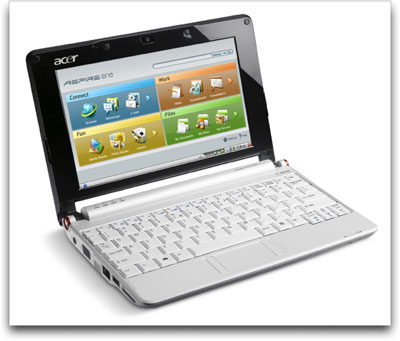
Anyway, I was strolling around Incredible Connection the one day and passed an advert for a Acer Aspire One Netbook that only ran on a custom version of Linux, for the crazy price of R899.00!

I was a bit hesitant at that price as I have NEVER used Linux, I always wondered what it was like but NEVER used it. Another shopper walked by and said if I was not going to take it he would, as it is an awesome machine to have if you removed the OS and loaded Ubuntu Netbook Edition on it.  Pressed for a decision I took it with the thought that if I did not like it I could always sell it for the same low price to someone that may find it helpful.

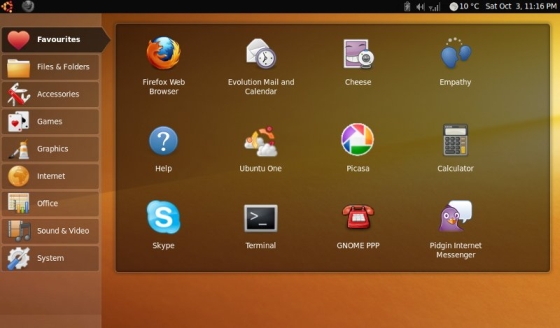
At home, I did a Google search for Ubuntu Netbook Edition and found a few screen shots and where to download it from.

The interface looked clean and user friendly, it came with a whole bunch of apps preloaded so I clicked the download button. I then installed it on the machine. For a netbook  with only 512Mb of RAM and 2Gb SSD it was a perfect little device to surf while in bed or edit a quick document or two.  Plugging in the 3G modem it immediately detected and I was on the internet in seconds.  I started to think that Linux was not that scary after all!

A friend of my wife was in the market for a “cheap” PC to “only surf the internet” and “occasionally type a document or two”.  I said I would got back to Incredible Connection and see if they had any more Acer Aspire One’s.

I went to the first Incredible Connection, sorry no Linux one’s only Windows one’s that cost R2999.00.  Went to the next Incredible, same story.  When at the forth Incredible Connection I got to had the same story I asked the sales person why they were no longer selling the Linux one. He said to me that Microsoft had instructed their head office to stop selling it or else…

That got me thinking…why would Microsoft (whose products I used and loved) would feel threatened enough to prevent a chain store selling a Linux machine.  Thoughts of Microsoft being in the news about their anti-trust law suits and slashdot articles of uncompetitive behavior and tactics in certain countries came to mind…

I then thought about what I actually use my home PC for:  surfing the web, some website designing, editing of graphics, the occasional document or two and the fact that I did not use it for gaming (I have a PSP, DS, PS2, PS3, Xbox for that) also meant that I would not miss much that if I converted over to Linux…

I was nervous to make the change, so I built up another PC which I installed Ubuntu 8.10 on; while leaving my Windows home PC safe in the corner of my study.  I decided that the only way that I could really learn to use Linux and see if it was for me (and see what made Microsoft so nervous) was to force myself to use it NO MATTER WHAT at home.  Like I said it has almost been a year now, and I still consider myself very much a newbie but I am really enjoying using Linux (have since upgraded all the way to Ubuntu 10.04) and although I have not switched my old Windows home PC on for about 8 months now, I think maybe it is time for me to remove Windows and set it up for another purpose.  In case you wondering I still have my Windows Home Server, but I need to rebuild it thanks to Seagate…so not powered it on also for about 3 months now…

In closing I would just like to thank Microsoft for being so paranoid about Linux that they have made me see that Linux is really not that bad…  Go ahead, try it, it might just surprise you…

Android 3.0 (Honeycomb) Teazer Video

I have for some time now, wanted to get one of those Android Tablets that they advertise so “cheaply” on Ebay. There has also been a local supplier importing them, but the lack of front facing camera has prevented me from getting one.  I suppose this desire  is due to me setting up a few Apple iPads at the office for those staff bringing back from overseas trips, and also because I think it would make a nice EBook Reader (similar to the Amazon Kindle or Barnes and Noble Nook).

Anyway after seeing the video below of what Google says Android 3.0 (aka Honeycomb) will look like I think I will hang ten for a while and carry on using my iPod Touch and Netbook to read ebooks on…(will post about that some time)

Have a look see what I am talking about…

Can’t wait!