Starship Home Theater

I think it is every movie loving geek to have a personal home theater at home.  A place where you can sit back and relax while watching your favourite DVD in style and comfort – at home.

Well designers, Acoustic Innovations of Boca Raton, FL. exactly did that for a family living in this not to humble 10000 square feet home in Hawaii…

OK now that I have stopped drooling over the house, lets look at the real reason about the post…the movie theater!

No you are not looking at the inside of a Star Wars spaceship…that is the home theater!

The shuttle “windows” are actually  six flat panel HDTVs, each with a futuristic touchscreen remotes from Crestron. There are life-size R2-D2 and C-3PO droids that talk. It also has a three dimensional fiber optic starscape (roof) and also the interesting motorized pocket door that is the entrance thus really making you feel as if you are stepping into space.

When designing it the designers didn’t want the computer equipment to break the intergalactic illusion, so they hid it behind acoustic panels on the walls were designed to look like starship doors, equipment racks can turn 180 degrees, so they can be concealed by a concave cabinet, and the Runco DLP projector that makes the magic happen is hidden inside a soffit in the rear of the room. The screen is a curved, anamorphic 107-inch display from Stewart Filmscreen, which is acoustically transparent to accommodate the five speakers behind it.

As you can see it opens up and swings 180 degrees to show the kit…

Sigh…  Check out the sources below for a few more photos.

One day when I grow up and make lots of money I will also do that, in the meantime the 81cm Sony CRT TV will have to do…  🙂

(Source: ElectronicHouse and NewLaunches)

Computer Repair with Diagnostic Flowcharts (even for dummies!)

Sometimes the staff at my place of employment try and diagnose their own personal PC problems.

Sometimes they are lucky and fix it themselves. Other times (more often than not) they bring it into our office in a terrible condition (just short of loosing data or already lost data) for us to have a “quick” look (aka fix).

Well now troubleshooting has just becomes easier (and a lot less risky) thanks to Morris Rosenthal and his “Computer Repair with Diagnostic Flowcharts

To quote his site:

This page offers links to flowcharts for PC diagnostics, excerpted from my book. The non-active links are for charts that are included in the book but not available online. The published book contains seventeen flowcharts for computer diagnostics plus a short text for every chart expanding on the decision points. The troubleshooting process is the same for an expensive Sony or IBM, or a downmarket eMachines or Acer. Dell and HP (who purchased Compaq) manufacture desktop PC’s in a wide range of price points, but you have to go through the same troubleshooting steps for the cheap ones as the expensive ones if you want to correctly identify and repair the failure.

The eBook can downloaded anywhere in the world for $9.95 or the book can ordered from Amazon for $14.95, or from Amazon UK for £9.95 or through any retail store by the title “Computer Repair with Diagnostic Flowcharts Revised Edition” or ISBN which is: 0-9723801-7-5.


It is a good start if you are not technically minded and want to troubleshoot your own PC…before taking it to a pro  🙂

PS3: Backup Manager – multiMAN

I must start this post off saying that I do not condone software piracy.

Let me repeat that – I DO NOT CONDONE SOFTWARE PIRACY.

Please Don’t Pirate Games – Support The Developers By Buying The Games.

I do however feel that if you have legally purchased a game you should be allowed to make a backup copy of the media in case you manage to damage the disc…which btw I have a Uncharted 2 disc that has developed a few cracks in the middle from being taken out the cover a few to many times…

The reason why I loaded CFW onto my one Playstation 3 was to be able to load a backup manager so that I could backup all my games – which currently stand at 70x Playstation 3 Games.

The backup manager that I found to be the easiest to use, that worked like a charm and was being updated with new features at an incredible rate was multiMAN, which is created by a guy named Dean.

This is what the interface looks like (not my image) and it is only one of the many layout options available.

Now I was busy drawing up an instruction post on how to setup multiMAN, but the excellent website (that I check on a daily basis for PS3 news) called PS3Crunch.com, beat me to it and has an excellent easy to follow tutorial here which contains links to files that you will need.

I took a Samsung 1Tb drive (I will NEVER touch another Seagate drive) and put it into a external USB enclosure (Agestar 3UB3A8), this was on special when I purchased it and yes I know it is really overkill.  I then formatted the whole drive with FAT32 (read here for the tutorial if you use Windows), and plugged it into one of the USB ports of the PS3 that had the CFW and multiMAN loaded.

Now what is really great about multiMAN is its simplicity. You can insert your PS3 game into the drive, fire up multiMAN, hit the [CIRCLE] button and it will give to options to either backup the game to the internal drive or external USB drive (obviously USB is the route that I went).  Then press [X] to launch the game from either the backup drive or from the game disc itself.

Needless to say that backing up my PS3 games collection took quite some time – two weekends and about 4 hours each evening in the week – but it is finally done.  I now only have 300Gb free on the 1Tb drive… Backing up takes on average about 15-25 minutes dependent on the game, as some vary from 2Gb in size to just over 30Gb.

Now if you want to see a list of the games that are compatible running from the multiMAN backup manager have a look here. Here you can see if the game will run from either internal or external (usb) drive, or even discless.  More games are added to the list with each new version so keep a look out!

I will still create another post listing all my games I have (my wife still wants to know why I have so many when I hardly have time to play) but this will take some time.  But for the meantime I am at least able to play some of them easily without having to take the disc out the cover thanks to multiMAN.

Thank you Dean for a job well done on developing multiMAN to the awesome app it is today!  Keep up the great work!

DISCLAIMER: The above post is for educational purposes only! I do not condone piracy or hacking, but believe that if you purchase hardware you have the right to use it as you please. I also believe if you buy a game you have the right to make and use a backup copy of it to ensure your original media does not get damaged.   Please Don’t Pirate Games – Support the Developers!

ASCII Art Generator

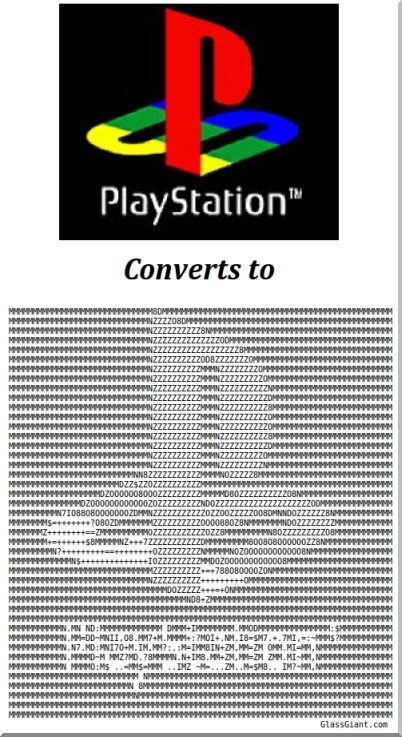
Typing xx&eHHm&HHx&eH might not look like anything initially, but put more together on a line and add a few more lines then you can end up with something that looks like this…

This form of art is also know as ASCII art.  It is the art of taking normal letters, symbols and numbers and laying it out in such a way that a picture is created.

Now if you have a lot of time and patience you can try your hand at it OR you can use an ASCII Art Generator…  upload your picture you want to convert and then specify the size and click generate – no mess no fuss.

I stumbled upon a website called GlassGiant.com that has an ASCII Art Generator.

I must admit I was pretty impressed with the results. I took a photo from Facebook and then some random Google images and told it to convert for me.  Here is just one example of what it did (squint your eyes if you not getting it…)

Give it a try – you know the ASCII geek in you wants to…  http://www.glassgiant.com/ascii/

LighterSide: Download the Internet

Many years ago the joke went around that a blonde walked into a computer shop and bought a box of floppys and asked the technician to download the internet for her onto them  🙂

Weedpoop (don’t ask) posted this picture on Tumblr and that joke rushed to mind.

Dirk, my one technician, also reminded me about this animated GIF for those of you who want to download the internet to your hard drive and are wondering if you will have enough space/time…

Hee, hee…

(Source: Weedpoop and W3Schools)

Monday Movie Mix – Animation

Here is this Monday’s Movie Mix…

The theme this week my son and newly born daughter will love – animation!

Here are some animated films to look out for in 2011

1. Rango     (Release Date: 4 March 2011 US)

Watch and tell me you aren’t excited about seeing this one…

Trailer 1:

Trailer 2:

2. Rio     (Release Date: 8 April 2011 US)

Love the spider part…
Trailer 1:

Trailer 2:

3. Kung Fu Panda 2     (Release Date: May 2011 US)

Po is back…OK that sounds bad…


And last but NOT least!

4. Cars 2     (Release Date: Summer 2011 US)

Maters turn in the spotlight…